 ES Studios
Your subscription
Local Leads MAX Monthly
UnlockedShow up higher on Google & AI Search, win the calls, and run every job from one app.
One last step: connect your Google Business Profile
All the work we do happens inside your Google Business Profile, so we need permission to get in. Takes about a minute.
Connect it instantly
Sign in with the Google account that owns your listing and pick your business. That's it, you're done.
Connect my Google Business ProfileGoogle's own sign-in. We never see or store your password.
Add us as a manager yourself
If the button didn't find your listing, add us by hand instead. A few taps inside your profile.
Add this email address
-
Search your business name on Google
Make sure you're signed in to the Google account that owns the listing.
Type your business name into Google. -
Tap the three dots on your panel
Top right of the box that appears above the results.
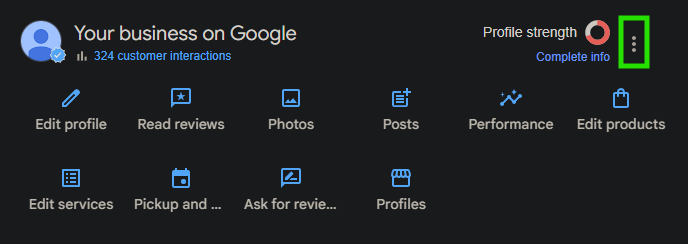
Tap the three dots in the top right. -
Choose “Business Profile settings”
From that three-dot menu.
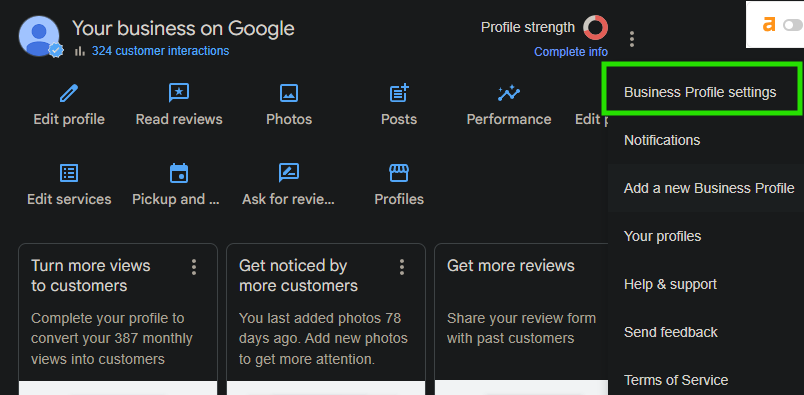
Menu → Business Profile settings. -
Tap “People and access”
This lists everyone who can manage your listing.
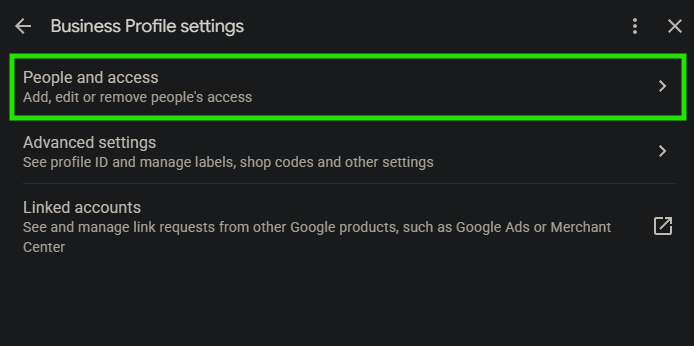
Business Profile settings → People and access. -
Click “Add”
Top of the People and access panel.
People and access → Add. -
Paste our email, pick Manager, send the invite
Paste [email protected] in, set the role to Manager (not Owner), then hit Invite.
Email → role Manager → Invite.